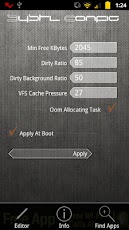
In this article I want to explain a little that I know about sysctl. Sysctl Config is a utility application that are common to most custom ROM2 or you can get it for free on the android market. What's the point? The point is to tweak sysctl.conf file in a more human being What are the requirements? I certainly Handheld Android (of course) that has Root and busybox already installed. Root does not need to Explain it? Busybox installer (busybox application name) please look at the market, after the install, uninstall busybox installer wrote, anyway busyboxnya keinstall already in the system than menuh2in space Well now up for discussion perbagian
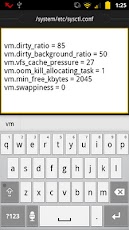
Before you continue, I want to explain that this tweak will not affect the results of such benchmarks quadrant, more towards hardware benchmark and is not affected by this tweak. What is this sysctl.conf? Because Linux-based Android, just like in linux, android is also contained in the file named sysctl.conf containing the kernel parameters. With Sysctl Config application (can be downloaded here) in android, we can modify the sysctl.conf file in our handhelds to improve performance and extend battery life. That is, here making batteries wear out too quickly / wasteful. For example, before I modify the sysctl, the Samsung Galaxy Mini me with my standard usage, at 6 am I unplug from the charger, at 6 pm I got the 20% battery remaining. After my modifications, at 6 pm I got home 50-60% battery remaining .... socmed quite make capital on college campuses klo pas anymore boring lecturers
Well, weakness (not a drawback due to this modification) is, point2 which can be edited with sysctl is cuman bit> _ <but there are many other parameters, but it's ok, according to my (now) it is enough to improve the performance of the device and battery endurance. Well now we cover per point parameters.
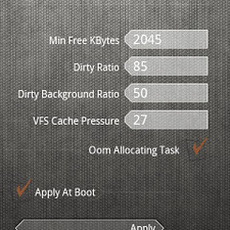
Min Free KBytes (vm.min_free_kbytes), is used to create the Virtual Memory (VM) Linux maintain minimum value kilobytes. VM used to calculate values for each zone pages_min low memory in the system. Each zone has a low memory in a system of free pages value (call it what yah, I jugak confused) reserves according to their own size. The default value is 2048 points
Dirty Ratio (vm.dirty_ratio) and Dirty Background Ratio (vm.dirty_background_ratio) function controls how often the kernel writes the data to disk (disk in this case is the internal sd card in the system / handhelds, not external sd card). When applications write data to disk, Linux does not actually write data directly to disk, but writing to the linux kernel handles system memory and when and how the data is inserted into the disk. Sysctl values presented in percentage, the higher the percentage that sampeyan enter, wait longer to enter the data on the disk, on the contrary, the lower the percentage value sampeyan entered, the data is more often incorporated into the disk. Now we ingat2 again, we are dealing with the internal disk solid state disk, not the disk with disk systems such as hard disk in the computer, so we can hold the system to enter data to disk in the disk longer than the system disk.
VFS Cache Pressure (vm.vfs_cache_pressure), nah .... which is interesting, the file system cache (dentry / inode) is more important than the cache block dirty ratio and dirty background ratio, so we want the kernel to use more RAM for cache file system. This will improve the performance of the system without sacrificing performance at the application level. The default value is 100 (in percentage), which must be done is change the lower percentage to notify the kernel that supports the file system cache and not to drop it suddenly.
Oom Allocating Task (vm.oom_kill_allocating_task) given in sysctl option is enabled or not tick mean or represent the value "1" / "0" or On / Off. This feature is used to activate or not the trigger for the killing task in situations OOM (Out Of Memory). If this is not checked / enabled, OOM Killer will scan the entire list of tasks and select the task that will kill based on heuristics (please googling means). OOM will usually choose a task that takes a lot of memory (memory hogging rogue) which will be a relief when in kill large amounts of memory. When this point is enabled / checked, then the OOM Killer going to kill apps that trigger OOM condition. This minimizes the scanning task which could result in a system hang or freeze.
Then how should I assign value2 in sysctl? Depending on hardware and masing2 comfort. The point value please try one by one. The bottom line with sysctl mengaktifan, let sampeyan try the default configuration for 1-2 days, if it is less, please permuted values. Galaxy Mini was when my settings:
Min Free KBytes: 16384
Dirty Ratio: 90
Dirty Background Ratio: 70
VFS Cache Pressure: 10
Oom Allocating Task: Active
The result as I mentioned above Good luck


Don't forget Max Battery Booster, it is free in https://play.google.com/store/apps/details?id=com.faygroup.maxbatterybooster
ReplyDelete